
Task Manager
The Task Manager is the operational dashboard for every background job in the CMS: scheduled tasks (sitemap, session cleanup, e-learning reminders), queued jobs (anything that does not finish inside an HTTP request), and the outbound webhook queue. It also shows the raw system status — PHP version, extension flags, memory limit, cron run times.
Open Settings → Task Manager. The screen has four tabs.
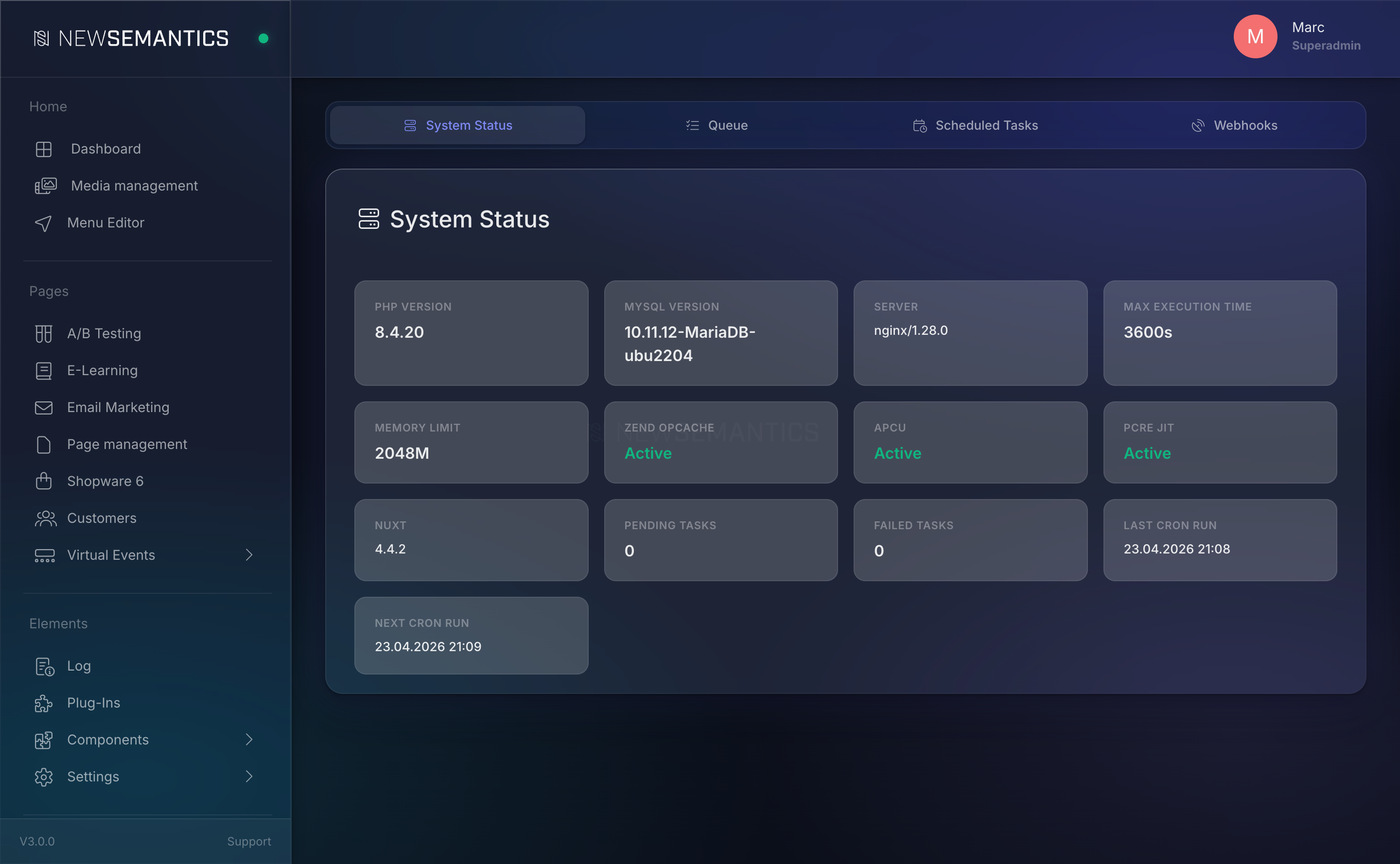
Tab 1 — System Status
The status tab is a grid of small cards. Read it top to bottom to diagnose a sluggish site.
| Card | What to look for |
|---|---|
| PHP Version | Should be 8.2 or higher. Older versions work but are unsupported. |
| MySQL Version | Informational. The system supports MySQL 5.7+, MariaDB 10.4+. |
| Server | The Server: header from the web server. |
| Max Execution Time | PHP max_execution_time. Long-running jobs (imports, deploys) need at least 300 seconds. |
| Memory Limit | PHP memory_limit. 256M is tight, 512M is comfortable, 1G handles big imports. |
| Zend OPcache | Must be Active on production. Inactive means slow PHP. |
| APCu | Must be Active. Inactive means no rate limiting and no response cache. |
| PCRE JIT | Should be Active. Affects regex-heavy code paths. |
| Nuxt | The version of the frontend build. |
| Pending Tasks | Jobs waiting to be processed. Non-zero but stable = healthy. Growing over time = the worker is not running. |
| Failed Tasks | Jobs that hit the retry limit. Investigate and clean up. |
| Last Cron Run | The last time the scheduled-tasks runner fired. Should be within the last 60 seconds. |
| Next Cron Run | Best-effort estimate of the next fire time. |
Cron not running
If Last Cron Run is more than a few minutes old, scheduled tasks are not firing. The server-side cron entry is missing or wrong. Ask your developer to set up the ./console/bin scheduled-tasks cron job.
Tab 2 — Queue
The queue holds API jobs that run out-of-band. Examples: AI layout generation, bulk imports, long CSV exports. Each job has a status: pending, processing, completed, failed.
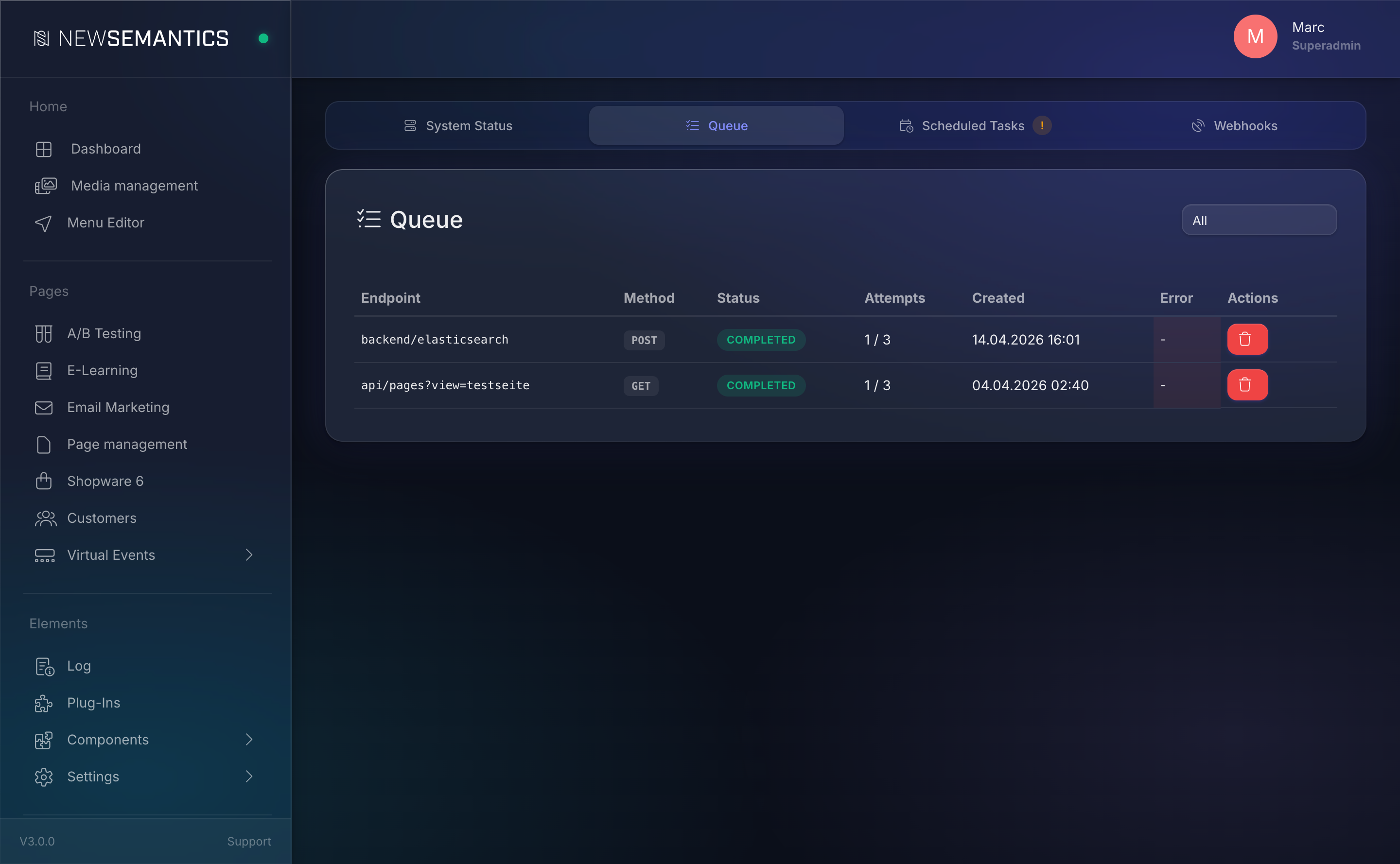
Columns:
| Column | Purpose |
|---|---|
| Endpoint | The API path the job calls. |
| Method | GET / POST / PATCH / DELETE. |
| Status | See the four states above. |
| Attempts | e.g. 2 / 3. The worker retries failed jobs up to max_attempts. |
| Created | When the job was queued. |
| Error | Last error message, if any. |
Retry or delete a job
- Retry (rotate icon) — re-queue a failed job. Resets
attemptsand moves it back topending. - Delete (trash icon) — remove the job. Available on any status.
Filter the view
The dropdown in the header filters by status (All, Pending, Processing, Completed, Failed).
Tab 3 — Scheduled Tasks
Scheduled tasks run on a fixed interval. They are registered by plugins at install time and live in the scheduled_tasks table.
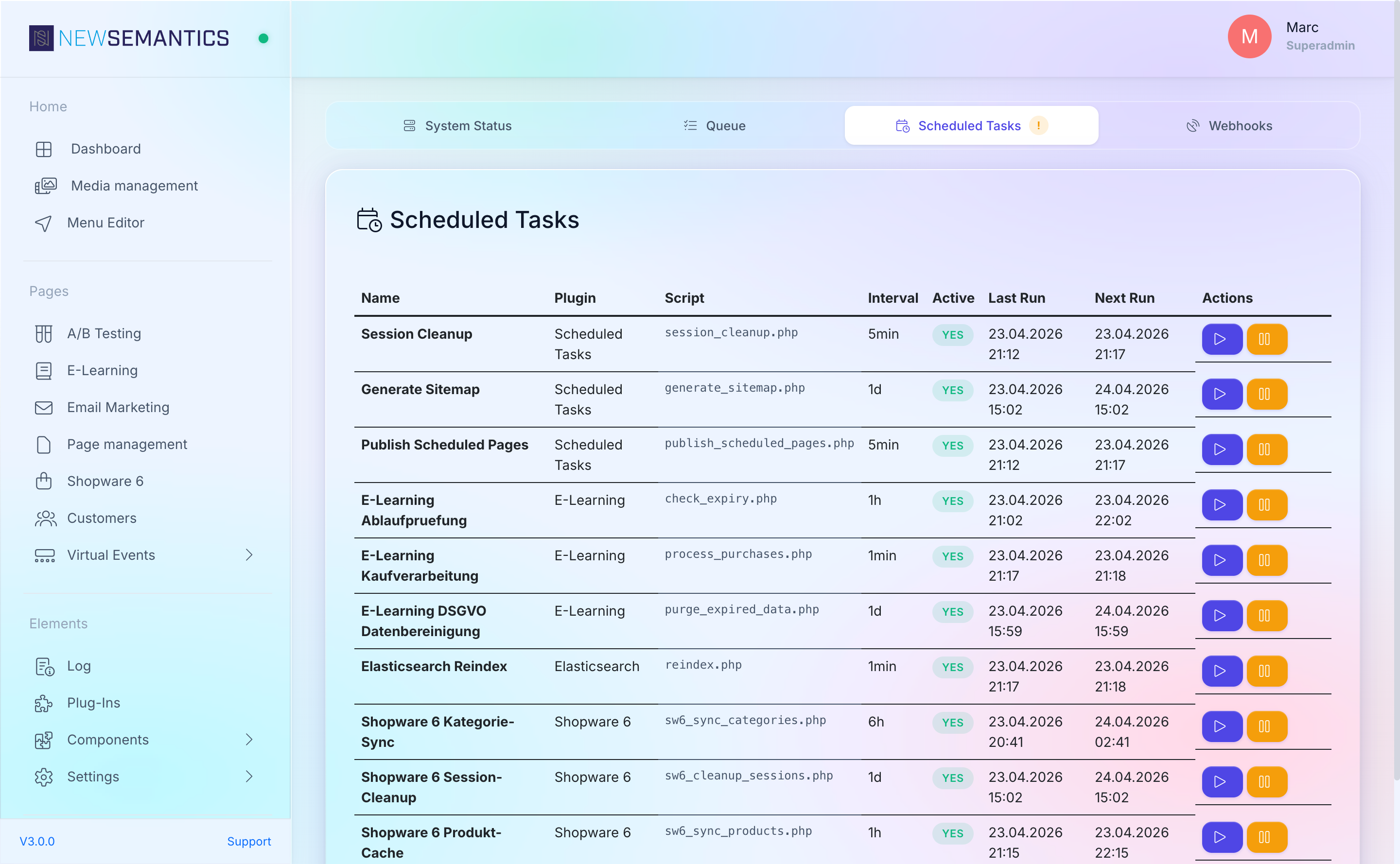
For every task you see:
| Column | Purpose |
|---|---|
| Name | Human label, e.g. Session Cleanup, Sitemap Generation. |
| Interval | How often the task runs (e.g. every 300 seconds = 5 minutes). |
| Last Run | Timestamp of the last successful run. |
| Next Run | When it is scheduled to fire next. |
| Active | Toggle to enable or disable the task. |
| Overdue | Red badge if Next Run is in the past. Means the cron is not firing. |
Run a task now
Click the play icon to fire the task immediately. The page shows a spinner while the task runs and updates the Last Run timestamp.
Built-in tasks
| Task | Interval | What it does |
|---|---|---|
| Session Cleanup | 5 min | Removes DB sessions inactive for more than 2 hours. |
| Sitemap Generation | 1 day | Regenerates /sitemap.xml. |
| Publish Scheduled Pages | 5 min | Publishes Drafts whose scheduled_at has passed. |
| Elasticsearch Reindex | 1 min | Picks up pending reindex jobs, one at a time. |
| E-Learning Check Expiry | 1 hour | Checks CME course access expiry per learner. |
| E-Learning Process Purchases | 60 sec | Activates purchases and grants access to courses. |
| Shopware 6 Category Sync | 6 hours | Refreshes the local Shopware category cache. |
| Shopware 6 Session Cleanup | 1 day | Removes stale CMS-to-Shopware session mappings. |
Plugins can register additional tasks through their bootstrap.php.
Tab 4 — Webhooks
Shows the outbound webhook queue and the delivery history. See Webhooks for the full picture.
The two badges in the tab label tell you quickly whether something is stuck:
- Yellow — pending deliveries not yet fired.
- Red — failed deliveries in the last 24 hours.
The cron requirement
Everything on this page depends on a single OS cron entry that invokes the task runner every 30 seconds:
* * * * * /usr/bin/php /path/to/site/console/bin scheduled-tasks --time-limit=25
* * * * * (sleep 30; /usr/bin/php /path/to/site/console/bin scheduled-tasks --time-limit=25)
* * * * * /usr/bin/php /path/to/site/console/bin process-webhooks --time-limit=25
* * * * * (sleep 30; /usr/bin/php /path/to/site/console/bin process-webhooks --time-limit=25)
The process-webhooks command drains the outbound webhook queue every 30 seconds and is a separate entry from scheduled-tasks. If either cron is missing, the queue fills, webhooks stop firing, sessions never get cleaned up, and the sitemap goes stale. The Status tab's Last Cron Run card is the single-number check.
Common issues
Pending Tasks keeps growing. Cron is not running. Check Last Cron Run. If older than two minutes, fix the cron entry.
APCu card is red. Install the php-apcu package on the server and restart PHP-FPM. Rate limiting and response cache stop working without it.
A scheduled task is stuck on "running". The process crashed mid-task. Click the refresh icon to clear the is_running flag, then run the task manually to verify it completes.
Failed task shows "Connection refused". The job called a URL that is down. Retry after fixing the target, or delete the job if it is obsolete.
See also
- Update Manager — system updates, migrations, deployments.
- Webhooks — the webhook queue shown in tab 4.
- Cache — the response cache that shares APCu with the rate limiter.