
XML Sitemap
The XML sitemap at /sitemap.xml lists every indexable page of your site — Pages, Blog articles, Shop categories, Shop products (both Native Shop and Shopware 6), and E-Learning courses. Search engines read the sitemap to discover content faster and to know when a page was last updated.
The sitemap is generated by a scheduled task. You do not need to rebuild it manually — but you can trigger a refresh from the Task Manager when you need to.
Where to read it
Open https://{your-domain}/sitemap.xml in the browser. You see a standard XML sitemap with <url> entries, last-modified dates, and <xhtml:link rel="alternate" hreflang="..."> annotations for multi-language sites.
What is included
| Source | Included when |
|---|---|
| Pages | Published and not soft-deleted. The homepage appears at the site root (/ or /de/, …). |
| Blog articles | Published and in an active Blog category. |
| Native Shop categories | Active categories. |
| Native Shop products | Active products with a URL-Rewrite set. |
| Shopware 6 categories | Synced categories from the Shopware 6 plugin. |
| Shopware 6 products | Synced and active products. |
| E-Learning courses | Active courses. |
What is excluded
- Pages behind login (users-only areas).
- Draft or unpublished content.
- URLs that are the source of an active 301/302 Redirect. (The sitemap only lists the canonical, final URL.)
- URLs marked noindex in SEO metadata.
- Admin URLs (
/admin/*,/api/*).
How often it regenerates
The sitemap is generated by the scheduled task generate_sitemap.php which runs once per day (every 24 hours). After a publish you typically see the change in the sitemap on the next calendar day.
The file is written to two locations:
{document-root}/sitemap.xml— served by the PHP backend._theme/vue-base/public/sitemap.xml— served by Nuxt when static-site rendering is used.
Both files are identical and updated together.
Robots.txt is updated too
If your robots.txt is missing a Sitemap: line, the scheduled task adds one pointing at /sitemap.xml. If the line already exists, it is left alone.
Force a regeneration
If you published a page and want the sitemap to reflect it right now — for example before you manually submit the URL to Google Search Console — trigger a manual run:
- Open Settings → Task Manager in the sidebar.
- Switch to the Scheduled Tasks tab.
- Find Generate Sitemap in the list.
- Click Run Now.
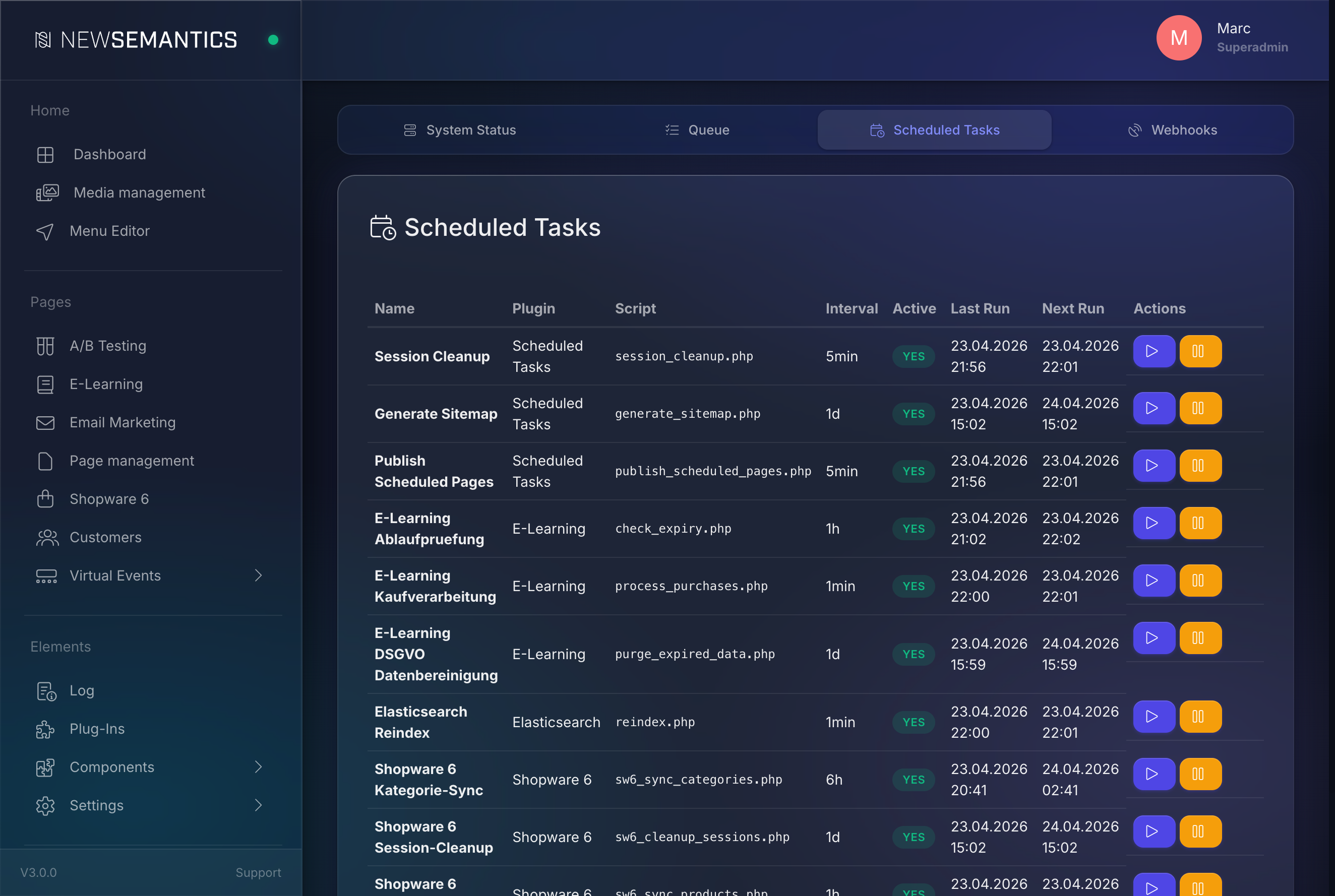
The task finishes in a few seconds on small sites; large catalogs (thousands of products) may take up to a minute. The Task Manager shows the run status.
hreflang for multi-language sites
On multi-language sites, every URL in the sitemap comes with <xhtml:link rel="alternate" hreflang="..."> entries pointing to its language variants. Google and Bing use these to serve the right language to the right audience.
Example for a page that exists in EN and DE:
<url>
  <loc>https://example.com/about</loc>
  <lastmod>2026-04-20</lastmod>
  <xhtml:link rel="alternate" hreflang="en" href="https://example.com/about" />
  <xhtml:link rel="alternate" hreflang="de" href="https://example.com/de/ueber-uns" />
  <xhtml:link rel="alternate" hreflang="x-default" href="https://example.com/about" />
</url>
x-default points to the main language. The CMS picks the main language from Settings → Languages.
Translate the URL-Rewrite per language
For hreflang to work you need a distinct URL per language — set the URL-Rewrite field in every language tab. See SEO Meta per page.
Submitting the sitemap to search engines
Most search engines discover the sitemap automatically via the robots.txt directive. For faster indexing on a new site:
- Google: Search Console → Sitemaps → submit
https://{your-domain}/sitemap.xml. - Bing: Bing Webmaster Tools → Sitemaps → submit the same URL.
You only need to submit once. Every regeneration is picked up on the next crawl.
Common issues
Sitemap is empty
Check Settings → Languages — the website.domain must be set. Without a domain the task bails out early.
A freshly published page is missing
Wait for the next scheduled run, or trigger one manually (see above). Also verify the page has Status: Published and an URL-Rewrite in the current language.
Old URL still in sitemap after a rename
The sitemap picks up the latest URL-Rewrite, but an old 301-redirected URL should not appear. If it does, verify that the redirect is Active and that no published Page still points at the old URL in its URL-Rewrite field.
See also
- SEO Meta per page — set URL-Rewrite and language variants.
- 301 Redirects — manage legacy URLs.
- Task Manager — trigger scheduled tasks on demand.